
NatureTreks VR
Timeline
February - April 2025
Role
UX Designer
Team
Just me!
Tools
Figma
Recognition
2025 ACM Siggraph Student Work Exhibit (Texas A&M, VIST 110)
Overview
Making Virtual Escapes Intuitive And Accessible
.NatureTreks VR is a VR application that lets users escape into calming virtual environments. The redesign tackles the biggest barriers for new users, such as complex navigation, unclear interactions, and physical discomfort, to make the experience more intuitive and accessible.
The Origin
Why Specifically VR?


This idea was inspired by my experience as a UX Research Assistant at the Soft Interaction Lab, where I led interactive art sessions for elderly participants with cognitive disabilities.
During testing for one of our sessions focused on VR applications, my team encountered cybersickness and navigation challenges in games like NatureTreks VR, motivating me to redesign centered on accessibility, comfort, and intuitive interaction.
The Problem
So Now What?
As I explored the intersection of wellness and emerging technology, I noticed that many first-time and experienced VR users, particularly college students, turn to meditation apps like NatureTreks VR seeking relaxation and stress relief.
However, instead of comfort, many of them encounter cybersickness and physical discomfort with the current design.However, instead of comfort, many new users encounter cybersickness and physical discomfort with the current design.
Problem 1: Homescreen
Lacking Context and Intuitiveness
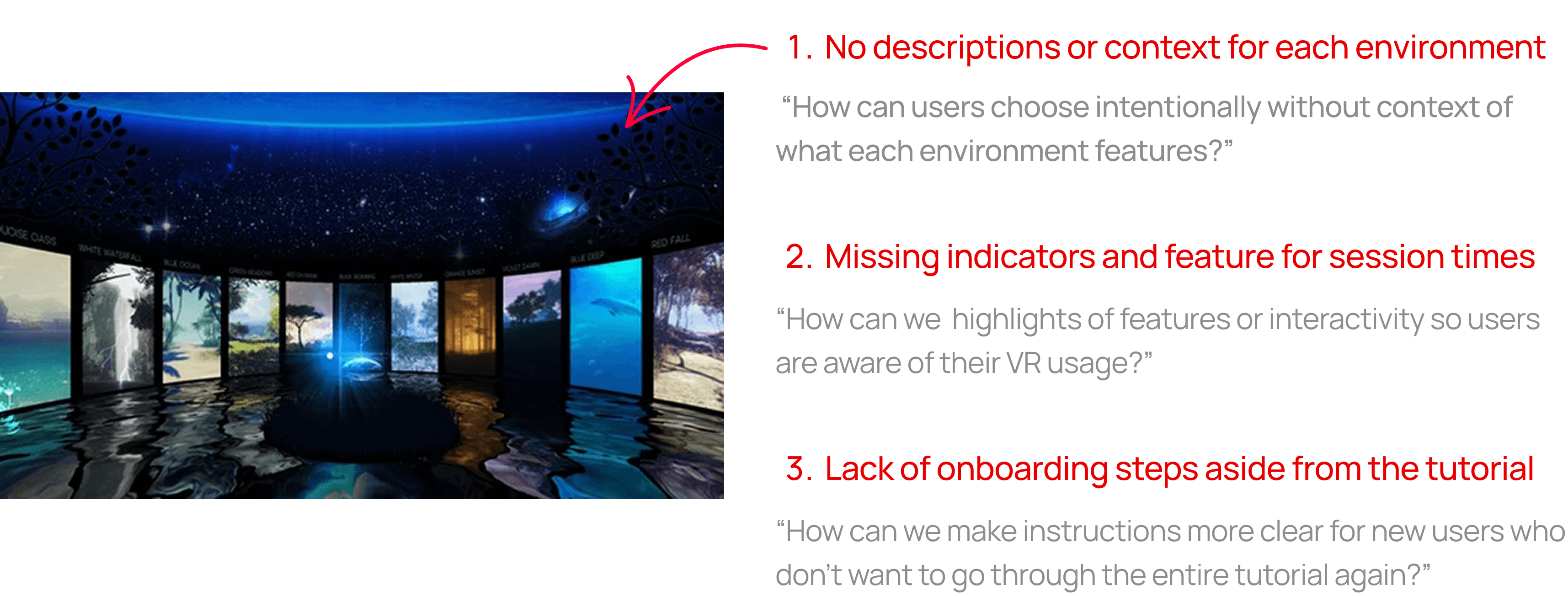
Problem 2: Environment Interaction
Lacking Accessibility And Proper Navigation

Through conducting some user testing with the current design of NatureTreks VR, I've learned that some of the main design problems were:
- The navigation and interactions often feel unintuitive for beginners
- Prolonged use can lead to strain, breaking immersion, and other cybersickness symptoms
- A tool meant to calm instead becomes disorienting and inaccessible, minimizing its full potential
The Problem Statement
Let's Think!
Before Jumping In…
What Are Our Primary Goals?


VIsual Process
Paper Wireframes

After receiving peer feedback on simplifying the variety of changes…
Visual Process
Paper Prototype
After receiving peer feedback on simplifying the variety of changes, I then created a 13-frame paper prototype with the featured changes like incorporating session time set-ups, session reminders, and a more initiative world selection process.
I had users go through the prototype frame by frame to evaluate the new button placement, usability, and overall ease of interaction, gathering feedback to improve the UI layout before digital implementation.
Visual Process
Digitial Protoype Iterations
Home Screen
World titles and descriptions displayed in a rotating carousel layout
Users select a world by clicking "Enter" to begin
Session Timer Input
Users can choose different session lengths to manage VR time and reduce cybersickness
Users can exit the session at any time
Visual Process
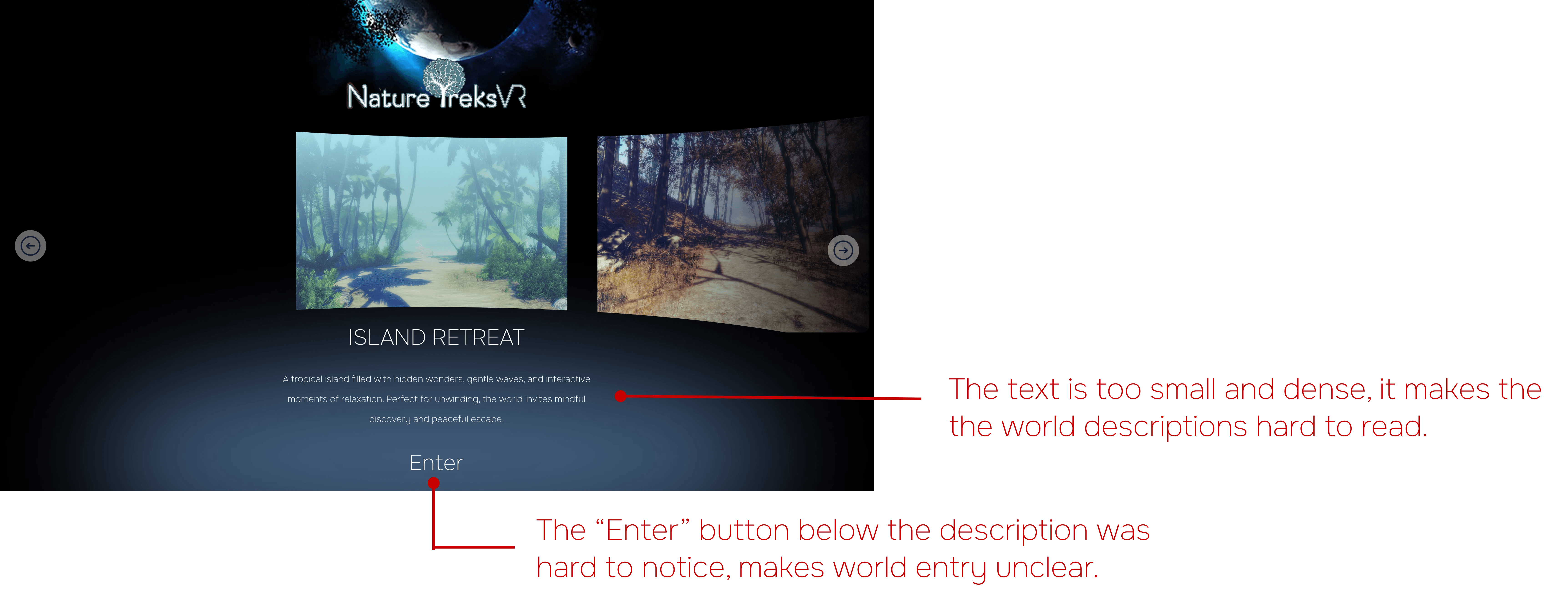
User Testing Feedback

Visual Process
Final Redesign
Home Screen
Added start screen with onboarding
Enlarged text and clearer environment descriptions
Highlighted "Enter" interaction with color change when hovering over world image
Environment Selection
5 distinct environments with clear titles and unique therapeutic vibes
Next/Back arrows for easier navigation and viewability
Added game logo and brief overview on the home screen for context
Custom Session Times
Preset 10, 15, 20, and 30 minute sessions for users who are new and/or indecisive
Adjustable session length options for user control. You get to decide as well!
Pop-up screen to reminder users they can leave the session at any time, any moment.
Orb Interactions & Buttons
Half-circle orb layout at bottom center with simplified icons for easier access
New buttons for settings, session timer reminders, and user help
Intuitive quit process with confirmation pop-up to prevent accidental exits
Accessible Session Reminders
Timer button shows remaining time when clicked
End-of-session pop-up lets users either extend or quit their session
If extended, users can restart and select a new session length
Extras
Design System

For this project, I was also able to create my first design system! These included different interactive states for buttons and icons (default, hover, and clicked) while still referencing core design elements in the original NatureTreks VR application.
Final Thoughts
Learnings
This project was something I've never done before! Working individually on redesigning a VR interface allowed me to challenge myself and think critically about usability, accessibility, and comfort. I especially enjoyed the user research aspect of designing wireframes and prototypes to understand how users interact with the interface and identify pain points.
In the future, I’d love to test this redesigned interface on an actual VR headset. While Figma was helpful for prototyping, its limitations in immersive design mean the UI may behave differently in a real VR environment. This project gave me valuable insights into creating intuitive, user-focused VR experiences while pushing me to explore the balance between design, technology, and user comfort.